Let’s build a Golang knowledge specific RAG system with a local llama LLM
Overview
In this article, we’re going to build a Golang knowledge specific RAG AI Chat system using open source and free components with the ability to make more documents available for it. This RAG system can be used for example for internal documentation, where we can make a chat LLM answer questions based solely on our documentation. Also, it means that it will be able to answer more specific questions that general use case chat LLMs fail with due to not being trained on the internal specific data set.
The code accompanying this article can be found here on Github. I’ll only highlight the main components here.
What is a RAG system
A Retrieval-Augmented Generation (RAG) system is a hybrid approach combining natural language understanding and information retrieval to improve the quality and relevance of generated responses. It is commonly used in conversational AI, search systems, and knowledge management applications.
Specific Retrieval-Augmented Generation (RAG) systems can surpass generic Large Language Model (LLM) offerings in several ways due to their tailored architecture and integration of domain-specific knowledge. Here’s how:
1. Domain Expertise and Contextual Relevance
- Generic LLMs: Pre-trained on broad, general datasets that may not capture domain-specific nuances or contain the latest information.
- Specific RAGs: Incorporate highly specialized, curated knowledge bases (e.g., medical journals, legal documents, proprietary business data). This enables them to provide accurate, context-aware responses for niche industries.
Example:
A RAG system for legal research could retrieve and summarize specific case laws, while a generic LLM might provide only a high-level overview of legal principles.
2. Real-Time Knowledge Updates
- Generic LLMs: Limited to static knowledge up to the model’s last training date, requiring extensive retraining for updates.
- Specific RAGs: Continuously updated retrieval components (e.g., with new documents, articles, or real-time APIs) ensure responses are current and relevant.
Example:
- A RAG for financial analysis could pull real-time stock market data, whereas a generic LLM would rely on outdated financial trends.
3. Customizability and Fine-Tuning
- Generic LLMs: Offer limited customization unless fine-tuned on specific data, which can be costly and resource-intensive.
- Advanced RAGs: Easily adaptable by updating the knowledge base or retriever configurations without needing to retrain the generative model. Users can tailor responses to their specific use case.
Example:
- A RAG for e-commerce could retrieve product details and stock availability directly from the database, whereas a generic LLM might hallucinate product features or availability.
4. Scalability and Cost Efficiency
- Generic LLMs: Generating responses directly from the model can be computationally expensive, especially for large models.
- Advanced RAGs: Offload much of the heavy lifting to the retriever, which identifies relevant knowledge efficiently, reducing reliance on the generative model and cutting costs.
Example:
- A customer support RAG might use a lightweight retriever to fetch FAQs, reducing the need for full generation for every query.
5. Explainability and Source Attribution
- Generic LLMs: Often act as a “black box,” providing outputs without transparency about the source of information.
- Advanced RAGs: Can cite the exact documents or data sources used to generate a response, enhancing trust and accountability.
Example:
- A RAG in healthcare could link its medical advice to specific studies, giving users confidence in its recommendations.
6. Mitigation of Hallucinations
- Generic LLMs: Prone to generating plausible-sounding but incorrect or fabricated information.
- Advanced RAGs: The retrieval step grounds responses in real, verifiable data, significantly reducing hallucination rates.
Example:
- A RAG for scientific research could retrieve peer-reviewed articles, ensuring factual accuracy, whereas a generic LLM might fabricate unverified claims.
7. Workflow Automation
- Generic LLMs: Focus solely on generating natural language outputs.
- Advanced RAGs: Can integrate seamlessly into existing workflows, automating tasks like document summarization, answering complex multi-step queries, and linking outputs to actionable insights.
Example:
- A RAG for project management could generate reports by pulling and summarizing data from various tools like Jira, Trello, or databases, while a generic LLM might struggle to provide task-specific details.
8. Security and Privacy
- Generic LLMs: Hosted on external servers, posing potential risks for sensitive data queries.
- Advanced RAGs: Often designed to work within secure environments, keeping proprietary data private and ensuring compliance with industry standards like GDPR or HIPAA.
Example:
- A RAG for a pharmaceutical company could operate entirely on-premises, safeguarding sensitive research data.
9. Task-Specific Optimization
- Generic LLMs: May struggle to optimize for specific tasks like ranking documents or answering highly technical questions.
- Advanced RAGs: Optimize retrievers and generators for particular tasks using specialized ranking algorithms, filtering mechanisms, and domain-specific fine-tuning.
Example:
- A RAG for academic research might prioritize retrieving highly cited papers and summarizing them effectively, outperforming a generic LLM in precision and relevance.
Components of a RAG System:
- **Retriever:**This component fetches relevant information from an external knowledge base or dataset (e.g., a document store, database, or API).Retrieval can be implemented using vector similarity search (e.g., FAISS) or traditional search algorithms.Typically involves creating embeddings of the data and queries using models like OpenAI’s embeddings, SentenceTransformers, or others.
- **Generator:**A generative model (e.g., GPT, LLaMA) uses the retrieved information to produce a coherent and contextually appropriate response.The generator doesn’t rely solely on pre-trained knowledge but enhances its output with the retrieved documents or facts.
- **Knowledge Source:**The repository where data is stored for retrieval. This could include documents, articles, structured databases, or any other form of text-based knowledge.
- **Pipeline:**Combines the retriever and generator, often with preprocessing (e.g., re-ranking retrieved documents for relevance) and postprocessing (e.g., refining the generator’s output).
Building our Golang knowledge domain specific RAG
As an example here, we will build a very small RAG system that is domain specific to Golang using Golang documentation.
We will start with a pre-trained free local LLM (llama). And we will use langchain open source free tools to build a retriever which we will feed it with Golang docs and blog posts with advanced Golang specific knowledge. We will use Python of course as the lingua franca of such things, despite my deeper preference to Golang.
Environment setup
- In a new directory called “golang-rag” let’s set up a python virtual environment. You need python “virtualenv” installed.
pip install virtualenv
python3 -m venv .venv
Create a python virtual env
This will create a new python virtual environment in our newly created directory.
Now let’s activate it
source ./venv/bin/activate
Activate the python venv
2. Now let’s install the needed dependencies. Here we will need some langchain packages including “langchain-chroma” which the the langchain library for the Chroma vector store database we will use as the vector store where we will store our documents.
We will also install “bs4” Beautiful Soup the well known HTML parser.
So let’s create our “requirements.txt” file and add the following packages to it.
2. Now let’s install the needed dependencies. Here we will need some langchain packages including “langchain-chroma” which the the langchain library for the Chroma vector store database we will use as the vector store where we will store our documents.
We will also install “bs4” Beautiful Soup the well known HTML parser.
So let’s create our “requirements.txt” file and add the following packages to it.
langchain_community
langchain-ollama
langchain-chroma
langchain-core
langgraph
langchain
chromadb
bs4
reuirements.txt
And now let’s install them with
pip install -r requirements.txt
installing requirements with pip
You should also have Ollama installed to manage local llama LLMs. You can install it here.
Our RAG system components
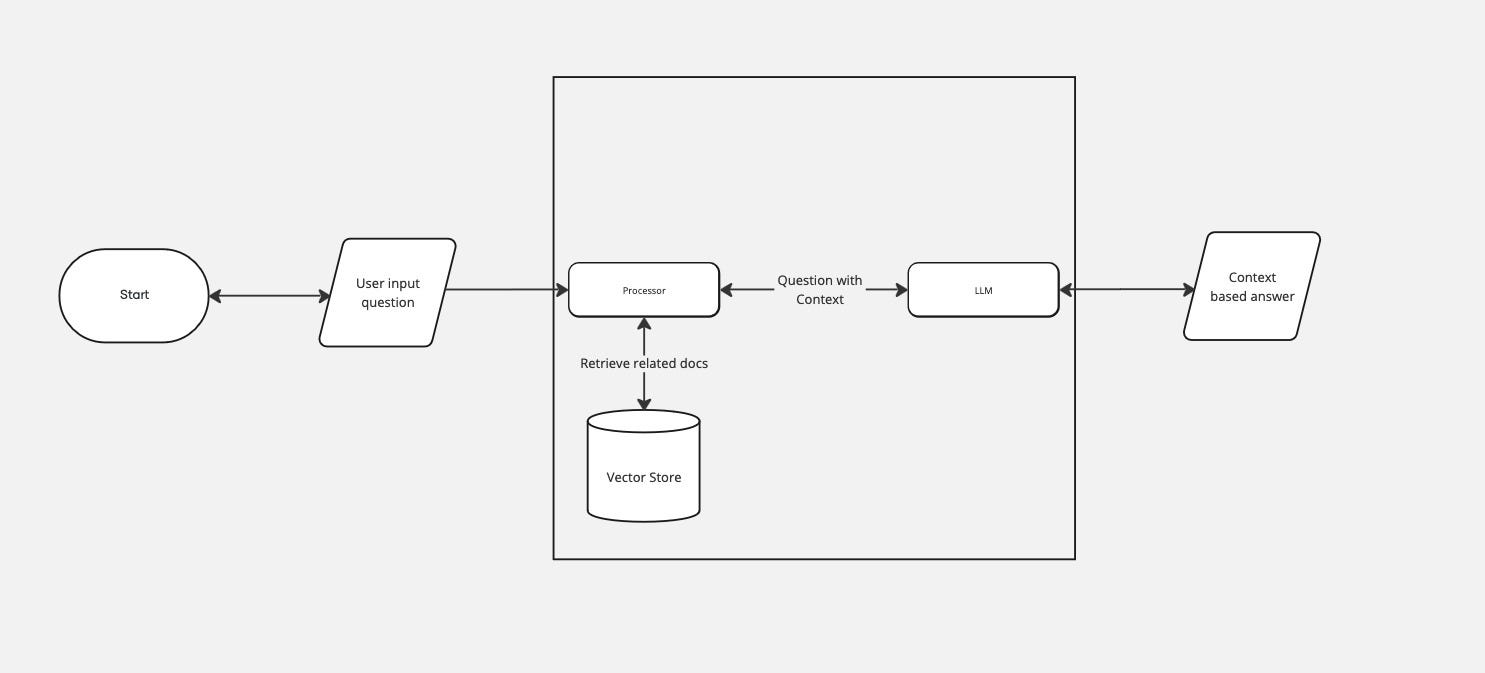
RAG Flowchart
Now let’s build it
We need to initialize the LLM after defining some global constants. We will use “llama3.2” model freely available after starting it locally.
model_name = "llama3.2:3b-instruct-fp16"
embeddings = OllamaEmbeddings(
    model=model_name,
)

def init_llm():
    global llm
    llm = ChatOllama(model=model_name, temperature=0)
    llm_json_mode = ChatOllama(model=model_name, temperature=0, format="json")
Initializing the llama LLM
We need to also initialize a vector storage to store the data we fetch from Golang blog posts and documentation. It’s important to the use the embeddings from the same model.
Embeddings are numerical vector representations of text, capturing semantic meaning to enable efficient comparison and retrieval. They are generated using machine learning models and are used to map similar texts close together in a vector space. These embeddings allow the system to search and retrieve relevant information from a knowledge base for generation tasks.
We will initialize the vector store in a local repo called “golang_kb” so that if we restart the system we can simply attach to it and not have to load the documents again every time we start our LLM.
def init_vs():
    ### Vector store
    persistent_client = chromadb.PersistentClient()
    collection = persistent_client.get_or_create_collection("golang_kb")
    global vector_store
    vector_store = Chroma(
        client=persistent_client,
        collection_name="golang_kb",
        embedding_function=embeddings,
    )
Initialize the vector store
Now we will write a function to load an HTML document over HTTP from a URL then:
- Parse it with Beautiful Soup to get paragraphs under a specific class name. In Golang docs, there is always a class called “SiteContent SiteContent — default” outlining the articles content.
- Split the docs into chunks. We don’t want to pass full documents into the LLM context. Even with big large scale LLMs that can process 70B tokens or more, we may not want to pass irrelevant info into the context. We want our context to be as close as possible to the answer, so the LLM only has to generate some nice words to explain it. The topic of retrieving docs with accuracy and best methods to store them goes deep and is particularly interesting. Here will not go into it in depth.
- Save the splits into the vector store.
def custom_filter(name, attr):
    return (
        "SiteContent SiteContent--default" in attr.get("class", [])
    )

def load_doc(url: str):
    init_vs()
    # Loading data from HTML resource over HTTP
    loader = WebBaseLoader(
        web_paths=(
            url,
        ),
        bs_kwargs=dict(
            parse_only=bs4.SoupStrainer(
                custom_filter
            )
        ),
    )
    docs = loader.load()

    print(f"### Loaded {len(docs)} web documents")
    # Split loaded docs
    text_splitter = RecursiveCharacterTextSplitter(chunk_size=1000, chunk_overlap=200)
    all_splits = text_splitter.split_documents(docs)
    print(f"### Splitted documents into {len(all_splits)} splits")
    vector_store.add_documents(documents=all_splits)
Load docs into the vector store
The remaining part is to define a work flow with a state of a query, generate and retrieve wrappers and a skeleton RAG Prompt that contains the user question and retrieved document. This prompt is what we’re going to pass to the LLM.
# Prompt
rag_prompt = """
You are an assistant for question-answering tasks. Use the following pieces of retrieved context to answer the question. If you don't know the answer, just say that you don't know. Use three sentences maximum and keep the answer concise.

Question: {question}

Context: {context}

Answer:
"""

class State(TypedDict):
    question: str
    context: list[Document]
    answer: str

def retrieve(state: State):
    retrieved_docs = vector_store.similarity_search(state["question"], k=8)
    print(f"### Retrieved {len(retrieved_docs)} docs related to the question")
    return {"context": retrieved_docs}

def generate(state: State):
    docs_content = "\n\n".join(doc.page_content for doc in state["context"])
    messages = rag_prompt.format(question = state["question"], context= docs_content)
    response = llm.invoke(messages)
    return {"answer": response.content}
Generate and retrive functions and a skeleton RAG prompt
Now all that remains is to define the main loop and command line arguments processing. We will have two commands.
- “load” to load a document from a URL.
- “start” to start the LLM and wait for user questions.
if __name__ == "__main__":
    args = sys.argv
    if len(args) < 2:
        sys.exit()
    if args[1] == "load":
        url = sys.argv[2]
        load_doc(url)
        sys.exit()

    if sys.argv[1] == "start":
        init_vs()
        init_llm()
        # Compile application and test
        graph_builder = StateGraph(State).add_sequence([retrieve, generate])
        graph_builder.add_edge(START, "retrieve")
        graph = graph_builder.compile()

        while True:
            user_input = input("How can I help you \n")
            if user_input == "exit()":
                sys.exit()
            response = graph.invoke({"question": user_input})
            print(response["answer"])

    print("Invalid command")
Main RAG loop
And now let’s test it!
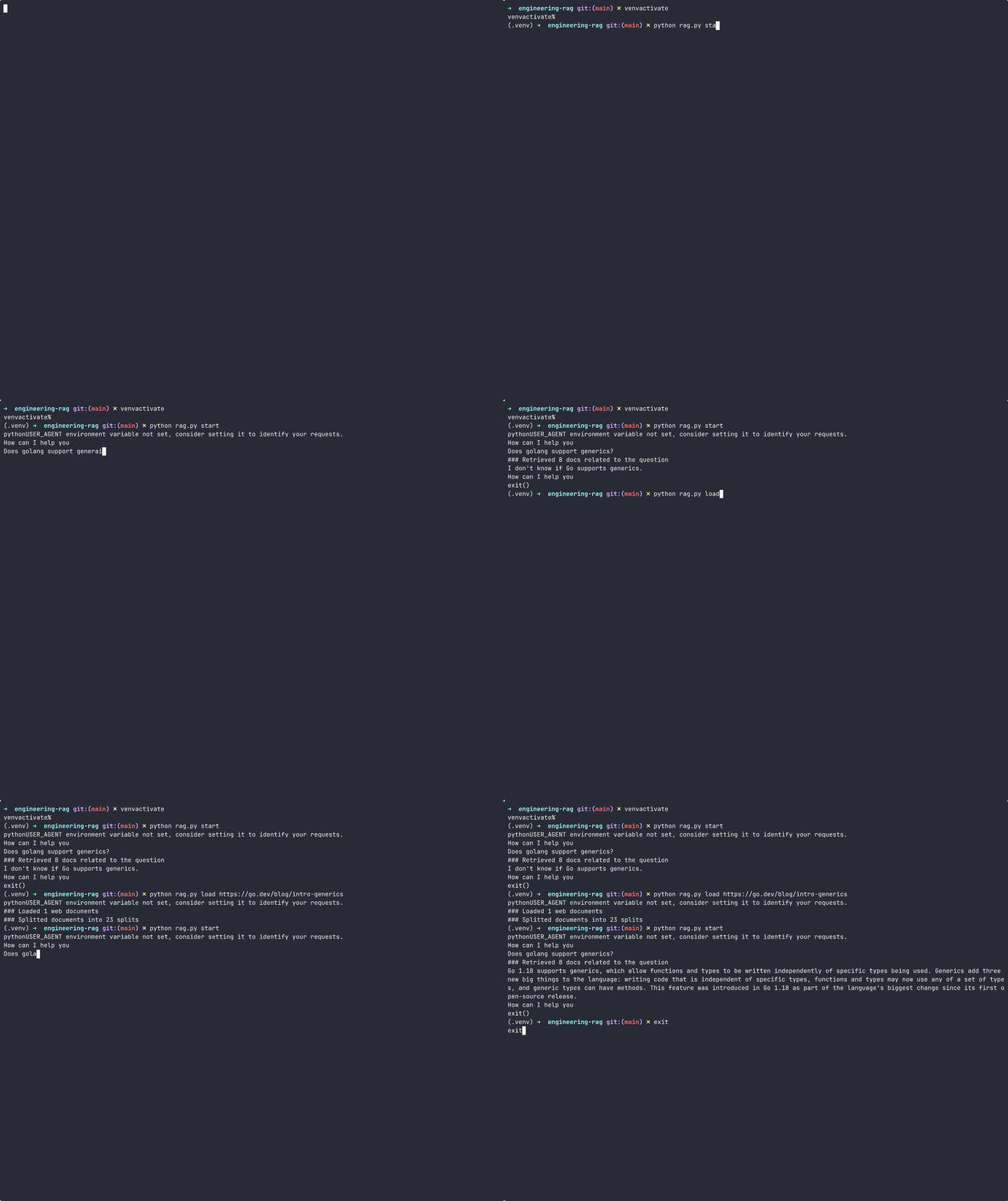
A demo of the RAG system running and loading documents
Voile!