An Experiment with RAG Search Accuracy
Overview
In a previous article, we explored the foundations of a basic Retrieval-Augmented Generation (RAG) system by building a straightforward implementation and loading it with articles from the Go blog. This simple setup allowed us to test the concept of enhancing search accuracy by combining a document corpus with advanced retrieval techniques.
Now, we’re taking that experiment further. In this article, we’ll delve into optimizing RAG search accuracy through more advanced techniques and comparisons. Specifically, we’ll discuss:
- Embedding Model Experimentation: Comparing OpenAI’s “text-embedding-3-large” with Llama3.2 to assess performance in document embedding and search relevancy.
- Cost and Privacy Concerns: Examining the trade-offs of using paid, non-local embedding models, including their potential impact on privacy and data security.
- Enhancing Search with Full-Text and Vector Search: Demonstrating how combining full-text search with vector search can yield more accurate results.
Through these explorations we aim to improving the effectiveness and accuracy of the previously built very simplistic RAG system while weighing the practical trade-offs involved.
Experimenting with Embedding Models for RAG Systems
In this experiment, I aimed to evaluate how different embedding models impact the accuracy of search results in a Retrieval-Augmented Generation (RAG) system. To test this, I loaded a “ChromaDB” instance with three blog articles from the Go programming language’s official site:
- An article about Large Language Models (LLMs) in Go.
- Another discussing alias generic type names.
- A third, exploring new features in Go.
To measure search performance, I used two embedding models: OpenAI’s “text-embedding-3-large” and “Llama3.2”. I crafted a query, “What is an alias name in Go?” which requires some understanding of the document’s context. Both embedding models were tasked with retrieving relevant results, and their output was scored in terms of cosine similarity.
Here are the results:
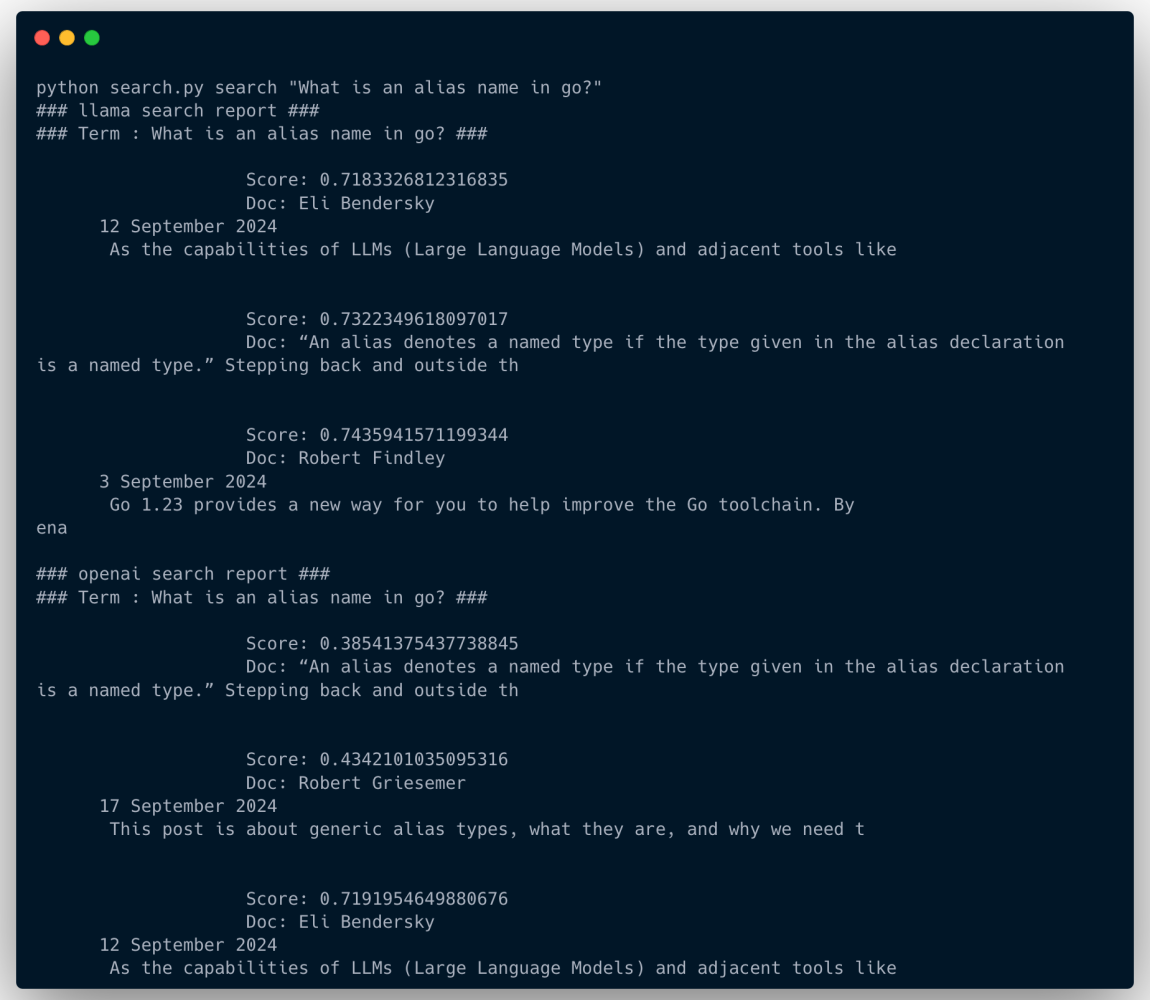
llama scoring non-relevant results with higher score
Interestingly, while Llama3.2 produced higher similarity scores, it assigned the highest score to a document about Go tool chain improvements — completely unrelated to the query.
The most relevant document containing the alias definition was included in the results but not in the top three, which highlights a critical limitation in Llama3.2’s ranking capabilities.
In contrast, OpenAI’s model prioritized the document directly answering the query, even if the similarity scores were numerically lower. This result demonstrates a seemingly better ability to find contextually precise information, which aligns better with the expected behavior of a RAG system.
Although this is by no means a scientific experiment, it is a no-brainer that choosing a better embedding model can significantly.
The better Open AI embedding comes at a cost
When building an internal RAG system for an organization that operates on private data sources, using a commercial embedding model like OpenAI’s can be challenging.
Of course there is the oncerns is data privacy. For some use cases, you won’t accept the risk of sending your internal data to OpenAI to create embeddings for you.
Let’s not forget that OpenAI embeddings are not free. Each API call costs money. Currently this nice OpenAI “text-embedding-3-large” costs $0.130 / 1M tokens
For organizations handling private data at scale, these trade-offs push for exploring alternative solutions. Open-source or self-hosted models may provide more control over both data privacy and operational costs.
Combining Vector and Full Text search
Now in the this section I explore setting up a vector store and a full text search system with python “whoosh”. And I explore how each of them scores the results of the same queries.
The idea is simply that Full Text Search will be better at capturing key words that may be missed in the semantic contextual search performed by the vector search. And if they both can compliment each other, then maybe we can achieve overall better search results which in tern will enhance our whole RAG system results.
The abstract class
I created this abstract python class with a basic implementation of loading and searching for documents in a vector store. Notice that the embedding model is to be declared in the concrete class. This is what I used to perform the OpenAI vs Llama experiment above.
class Store(ABC):
    def get_vs(self):
        return self._vs

    def set_vs(self, vs: Chroma):
        self._vs = vs

    def get_embeddings(self):
        return self._embeddings

    def set_embeddings(self, v):
        self._embeddings = v

    def set_text_splitter(self, v: TextSplitter):
        self._text_splitter = v
    def get_text_splitter(self):
        return self._text_splitter

    @abstractmethod
    async def load_doc(self, url: str):
        _, doc = fetch_and_clean_html(url)
        splits = self.get_text_splitter().create_documents([doc])
        for split in splits:
            split.metadata["path"] = url
        self.get_vs().add_documents(documents=splits)
        print(f"Loaded doc from url {url}")

    @abstractmethod
    def search(self, term: str):
        res = self.get_vs().similarity_search_with_score(term, k=5)
        return [(doc[0].page_content, doc[0].metadata["path"], doc[1]) for doc in res]
Abstract “Store” class with vector store load and search methods
Vector search with “llama3.2” embeddings
And here is the implementation to use “llama” embeddings. It splits the document to 1000 character splits and assigns cosine similarity as the disance method in chroma.
class LlamaSearch(Case):
    def __init__(self):
        embeddings = OllamaEmbeddings(model="llama3.2")
        self.set_embeddings(embeddings)

        persistent_client = chromadb.PersistentClient()
        vector_store = Chroma(
            client=persistent_client,
            collection_name="llama_search_collection",
            embedding_function=embeddings,
            # Set chroma to use cosine similarity instead of Squared L2
            collection_metadata={"hnsw:space": "cosine"}
        )
        self.set_vs(vector_store)

        text_splitter = RecursiveCharacterTextSplitter(
            chunk_size=10000,
            chunk_overlap=20,
            length_function=len,
            is_separator_regex=False
        )
        self.set_text_splitter(text_splitter)
    async def load_doc(self, url:str):
        try:
            await super().load_doc(url)
        except:
            print("Failed to load doc {url} into llama vector DB")
    def search(self, term:str):
        return super().search(term)
Implementing vector search with chroma and llama embeddings
Full Text Search with Whoosh
And here we implement the same abstract class for Whoosh search. I decided on Whoosh instead of things like elastic search just for simplicity.
class WhooshSearcher(Case):
    def __init__(self, index_dir="whoosh_index"):
        self.index_dir = index_dir
        self.schema = Schema(
            content=TEXT(stored=True, analyzer=StemmingAnalyzer()),  # For full-text search
            path=ID(stored=True, unique=True),  # Unique identifier for each document
        )
        # Create or open the index
        if not os.path.exists(self.index_dir):
            os.mkdir(self.index_dir)
            self.index = create_in(self.index_dir, self.schema)
        else:
            self.index = open_dir(self.index_dir)

    async def load_doc(self, url:str):
        """
        Add a document to the index with its content and unique path.
        """
        try:
            _, doc = fetch_and_clean_html(url)
            writer = self.index.writer()
            writer.add_document(content=doc, path=url)
            writer.commit()
        except:
            print(f"Failed to load doc {url} into Whoosh searcher index")

    def preprocess_query(self, term: str):
        """
        Preprocess the query to remove stopwords and extract keywords.
        """
        analyzer = SimpleAnalyzer()
        tokens = [token.text for token in analyzer(term)]
        return " OR ".join(tokens)  # Join tokens with OR for flexible searching

    def search(self, term: str):
        """
        Perform a full-text search across all document content.
        """
        with self.index.searcher() as searcher:
            # Parse the query
            parser = QueryParser("content", schema=self.schema, group=OrGroup)
            query = parser.parse(term)
            results = searcher.search(query, limit=5)

            return [(result["content"], str(result["path"]), result.score) for result in results]
Implementing full text search with whoosh
Loading Golang blog posts
And then I basically loaded all the blog posts form the Golang blog with limited concurrency. My poor M3 macbook struggled even when the concurrency semaphore was set to 5.
async def load_all_docs_from_go_blog():
    llama = LlamaSearch()
    whoosh_search = WhooshSearcher()

    urls = fetch_all_article_links("https://go.dev/blog/all")
    semaphore = asyncio.Semaphore(4)
    limited_load_doc = limited_async(llama.load_doc, semaphore)
    tasks = [limited_load_doc(url) for url in urls]
    await asyncio.gather(*tasks)
    print(f"Loaded {len(urls)} into data stores")

# Reusable function for limiting concurrency and handling exceptions
def limited_async(func, semaphore):
    async def wrapper(*args, **kwargs):
        async with semaphore:  # Limit concurrency
            try:
                return await func(*args, **kwargs)
            except Exception as e:
                print(f"Error in {func.__name__}: {e}")
                return None
    return wrapper
Loading Golang blog posts
And I fun searches for different terms and analyse the results. In each time, I set
k = 50 for it to return 50 search results in both vector and text search cases.
When normalization is not enough
I wanted to know if simply re-ranking the documents by normalizing the scores using
“Min-Max Scaling” normaliztion would be enough. So I set out to examine the data and making some plots.
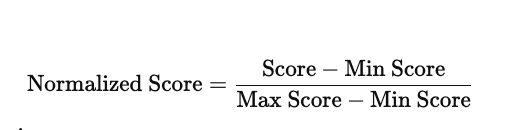
Given a search term, I built a map of the document IDs returned and their respective text search and vector search score.
And I wanted to figure out if the scores correlate in both search cases. And it was also fun to try to plot the values.
Histogram
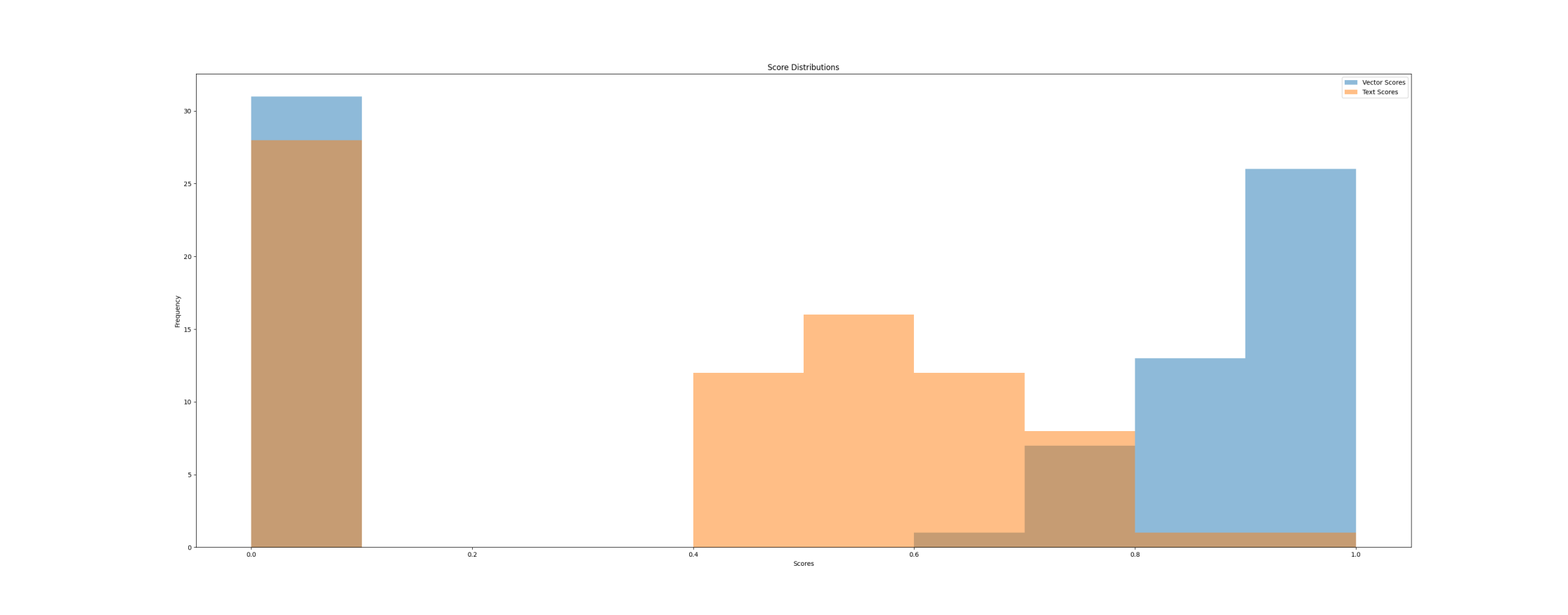
Histogram showing score distributions
Scatter Plot
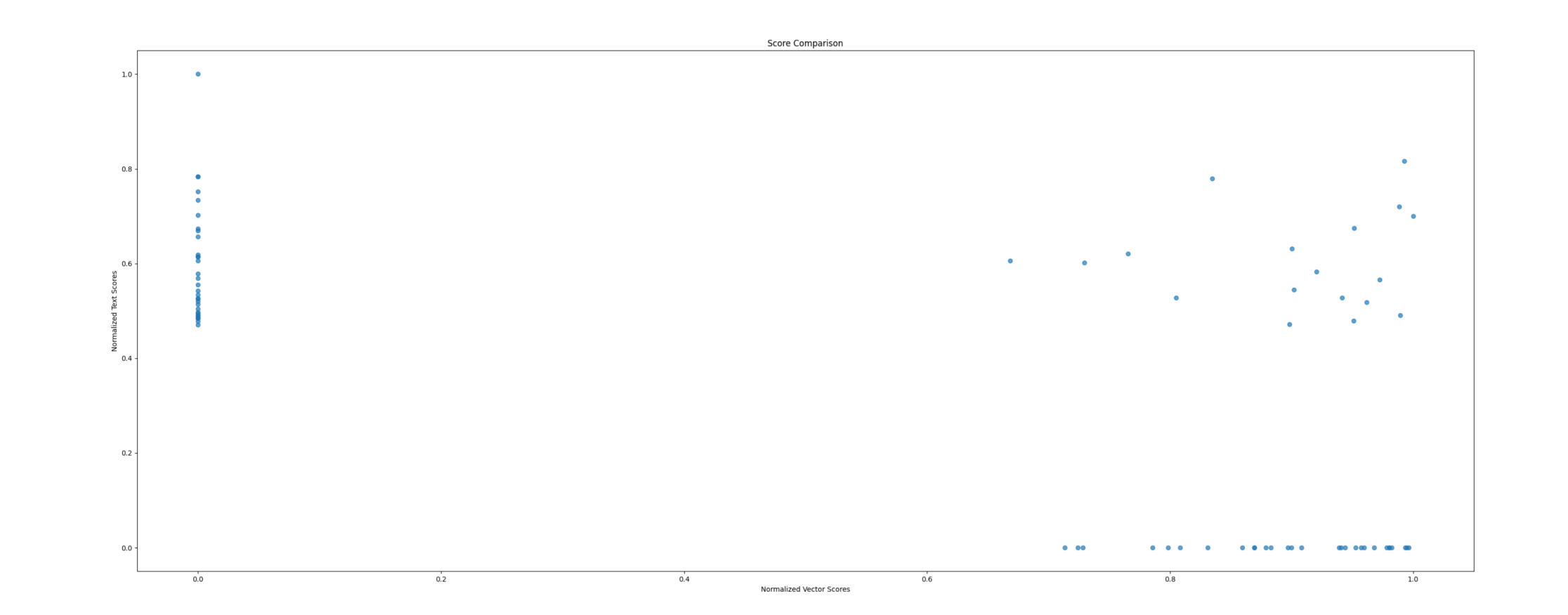
Scatter plot of text and vector search scores
Heatmap
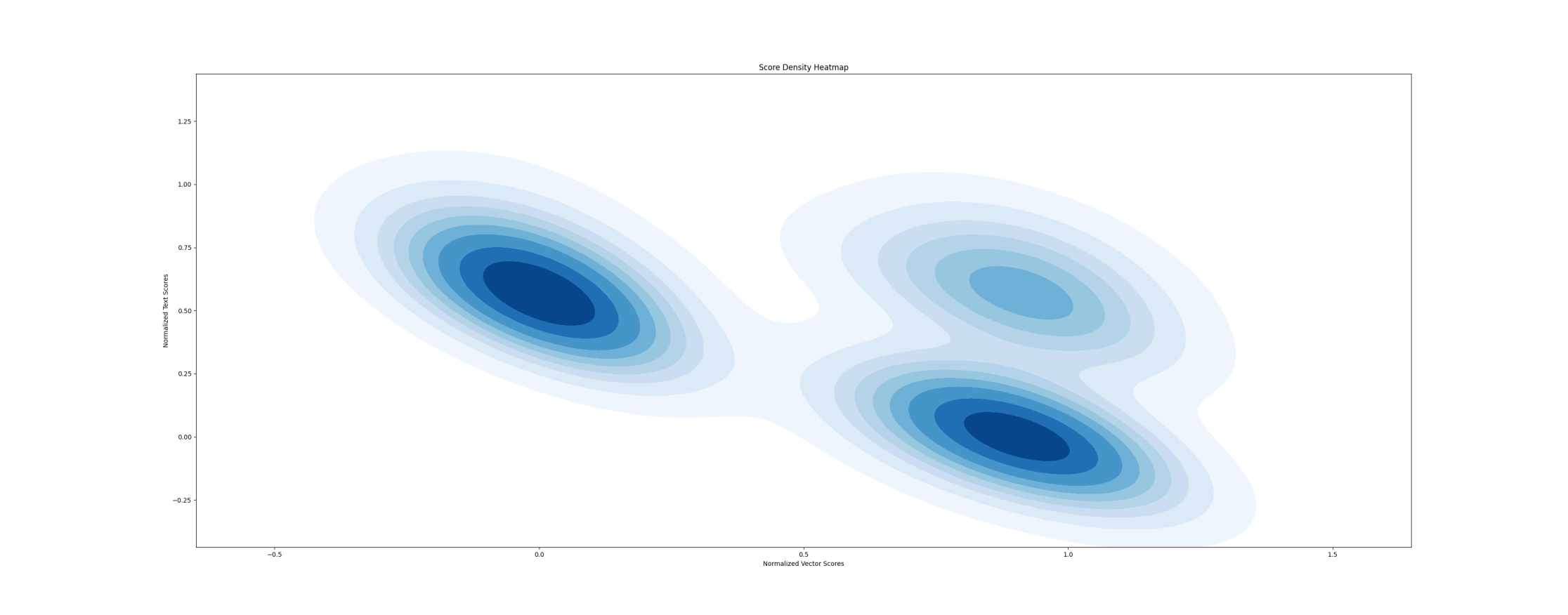
Heatmap of text and vector search scores
And overall the corrolation computed with the following function (plot code commented) gave a result of approximately -0.58. Indicating low correlation between the two search approaches.
def search_and_report(term: str):
    llama = LlamaSearch()
    whoosh_search = WhooshSearcher()

    vector_search_result = llama.search(term)
    print(f"=== Got {len(vector_search_result)} documents from vector search")

    text_search_result = whoosh_search.search(term)
    print(f"=== Got {len(text_search_result)} documents from text search")
    res = construct_results(vector_search_result, text_search_result)
    data = normalize_results(res)
    # plot_histogram(data)
    # plot_scatter_plot(data)
    # plot_heatmap(data)
    correlation = data["Normalized Vector Score"].corr(data["Normalized Text Score"])
    print(f"Correlation between scores: {correlation}")
Search and report corrolation
Bayesian Re-ranking
I settled on Bayesian re-ranking for combining evidence from multiple sources (e.g., scores from a vector search engine and a full-text search engine). It leverages Bayes’ theorem to calculate the posterior probability of a document being relevant given its scores from the sources. Documents are then ranked based on these posterior probabilities.
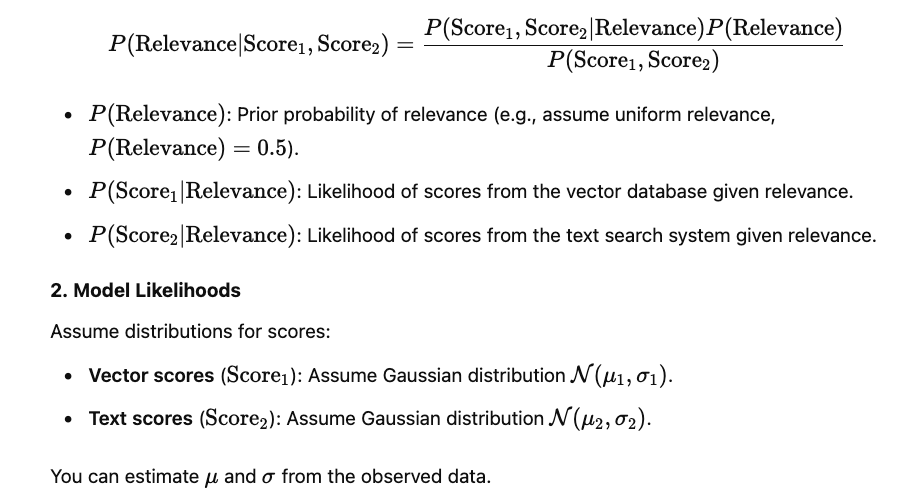
Bayesian Re-ranking theorem
With the following implementation
def rerank(data: pd.DataFrame):
    # Step 1: Define prior probability of relevance
    P_relevance = 0.5  # Assume uniform prior

    # Step 2: Fit Gaussian distributions for likelihoods
    # Vector scores
    mu_vector = data["Vector Score"].mean()
    sigma_vector = data["Vector Score"].std()

    # Text scores
    mu_text = data["Text Score"].mean()
    sigma_text = data["Text Score"].std()

    # Step 3: Calculate likelihoods
    data["P(Score1 | Relevance)"] = norm.pdf(data["Vector Score"], loc=mu_vector, scale=sigma_vector)
    data["P(Score2 | Relevance)"] = norm.pdf(data["Text Score"], loc=mu_text, scale=sigma_text)

    # Step 4: Calculate joint likelihood (assuming independence of scores)
    data["Joint Likelihood"] = data["P(Score1 | Relevance)"] * data["P(Score2 | Relevance)"]

    # Step 5: Compute posterior probability (unnormalized)
    data["Posterior"] = data["Joint Likelihood"] * P_relevance

    # Normalize posterior to ensure it sums to 1 (if necessary)
    data["Posterior"] /= data["Posterior"].sum()

    # Step 6: Rank documents based on posterior
    data = data.sort_values(by="Posterior", ascending=False)

    return list(zip(data["Path"], data["Posterior"]))
A simple implementation of bayesian re-ranking
I was satisfied with the results it gave out by my own observation. However, I’ll attempt in the following articles to evaluate how better / worse it is quantitatively.
I hope you liked going through this experiment with me.